


Document security is a foundational requirement for every business. With today’s interconnected systems, cloud platforms, and AI‑powered workflows, protecting sensitive information requires more than locking a file in a cabinet. Cyber threats, human error, and compliance requirements all demand a proactive, structured approach.
A single breach can cost a business financially, operationally, and reputationally. Staying ahead of attackers — not scrambling to catch up — is the key to long‑term resilience.
Below are the essential best practices every organization should implement to strengthen document security and reduce risk.
The Critical Role of Encryption
Encryption is one of the most powerful tools available for protecting sensitive information. It ensures that even if a document is intercepted, stolen, or accessed without authorization, the data remains unreadable and unusable. For organizations handling customer data, financial records, intellectual property, or regulated information, encryption is no longer optional — it’s a baseline requirement.
DID YOU KNOW?
Over 60% of businesses do not encrypt sensitive information stored in databases (Thales Group).
Why Encryption Matters
-
Protects data at rest and in transit
Files stored on servers, cloud platforms, or employee devices remain protected, and documents shared via email or collaboration tools stay secure during transmission.
-
Reduces the impact of breaches
Even if attackers gain access to your systems, encrypted data is far less valuable and significantly harder to exploit.
-
Supports compliance requirements
Regulations such as HIPAA, GLBA, PCI‑DSS, GDPR, and state‑level privacy laws increasingly mandate encryption for sensitive data.
-
Mitigates insider threats
Encryption ensures that only authorized users with the correct keys or credentials can view protected documents.
Types of Encryption Businesses Should Use
- Full‑disk encryption for laptops, desktops, and mobile devices
- File‑level encryption for sensitive documents and folders
- Email encryption for transmitting confidential information
- Database encryption to protect structured data
- Cloud encryption for SaaS platforms and storage solutions
How Encryption Integrates With Document Management
Modern document management systems (DMS) now include built‑in encryption capabilities that:
- Automatically encrypt documents upon upload
- Enforce encryption policies across departments
- Manage encryption keys securely
- Provide audit trails showing who accessed or decrypted a file
- Integrate with identity and access management (IAM) tools
This ensures encryption is applied consistently — not left to individual employees to manage manually.
Encryption + AI: The Next Evolution
As AI‑driven workflows become more common, encryption is evolving to support:
- Automated detection of sensitive content (e.g., PII, PHI, financial data)
- Real‑time encryption triggers based on document classification
- Adaptive encryption policies that adjust based on user behavior
- Secure AI processing that ensures models only access encrypted or anonymized data
AI and encryption together create a more proactive, intelligent security posture.
Document Classification System
A strong document security program begins with a clear Information Classification (IC) system. Classifying documents by type, sensitivity, or department ensures employees instantly understand who should access a file without opening it first.
When documents are clearly labeled, employees can quickly determine whether they are the intended viewer, reducing accidental exposure and improving workflow efficiency.
Keep Your IC System Simple
Your classification system should be structured but not overwhelming. Over‑engineering leads to confusion and inconsistent adoption.
A practical guideline:
Use fewer than ten default labels to categorize documents across departments. This keeps the system intuitive for both entry‑level staff and employees with elevated access privileges.
Avoid a binary “public vs. private” model, but don’t create dozens of hyper‑specific labels either. Simplicity drives compliance.
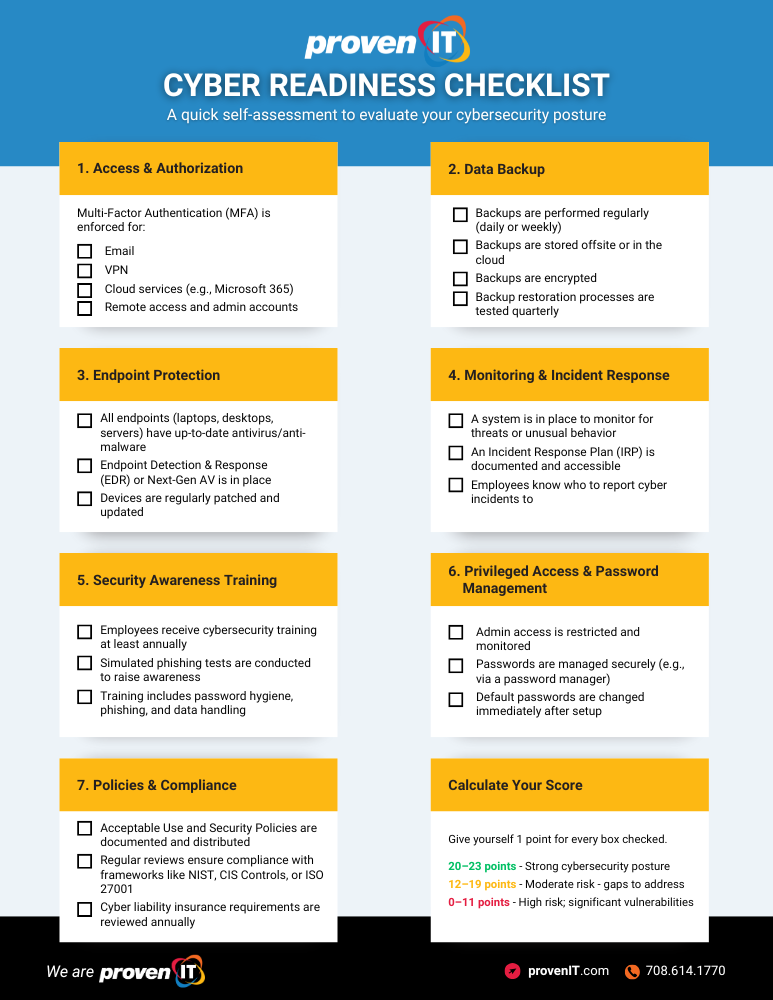
FREE RESOURCE
Download the Cybersecurity Readiness Checklist to evaluate your organization’s current security posture and identify gaps before they become vulnerabilities.
Assign Privileges
Access control is one of the most effective ways to protect sensitive documents. Assign privileges based on job role, department, and necessity — not convenience.
Role‑based access control (RBAC) ensures:
- Employees only see what they need
- Sensitive documents remain protected even if misdirected
- Authentication and audit trails are enforced
- Insider threats and accidental exposure are minimized
Privilege management is a core pillar of cybersecurity compliance frameworks across industries.
Educate Employees
Employees remain one of the most common sources of document‑related breaches, not always out of malice, but often due to misunderstanding. Training is your strongest defense.
Education should include:
- How to use your IC system
- Why classification matters
- How to identify phishing attempts
- How to securely share, store, and dispose of documents
- What to do when something seems suspicious
Educational activities may include:
- Hosting cybersecurity workshops
- Running simulated phishing tests
- Sharing weekly security tips
- Updating password and MFA policies
- Reviewing incident response procedures
- Highlighting recent breaches and lessons learned
- Recognizing “security champions” within departments
👉 Dive deeper into these activities.
Printer Security
Printers and multifunction devices (MFDs) are often the weakest link in an organization’s security strategy. Despite handling some of the most sensitive information — contracts, financial statements, HR files, medical records, legal documents — they’re frequently left unprotected. Modern printers are essentially networked computers, complete with storage, operating systems, and connectivity to cloud platforms. That makes them a prime target for cybercriminals.
Unsecured printers can expose organizations to data leaks, unauthorized access, compliance violations, and even full‑network compromise.
Essential Printer Security Best Practices
Enable user authentication
Require employees to authenticate at the device using PIN codes, ID badges, or MFA before releasing print jobs. This prevents documents from sitting unattended in output trays.
Use secure print release (pull printing)
Documents are only printed when the authorized user is physically present, reducing accidental exposure and insider risk.
Encrypt print traffic and stored data
Ensure printers support encryption for data in transit and at rest. This protects documents from interception or extraction.
Update firmware regularly
Printers need the same patching discipline as servers and workstations. Outdated firmware is a common attack vector.
Restrict access and segment networks
Place printers on their own VLAN, limit administrative access, and disable unused ports and protocols.
Implement secure disposal practices
When retiring or replacing devices, wipe or destroy internal storage to prevent data recovery.
Monitor and audit printer activity
Track who prints what, when, and where. Logging helps detect unusual behavior and supports compliance audits.
👉 Learn how Managed Print Services Helps Secure Your Print Environment
AI, Automation & the Future of Document Security
AI‑driven document management is transforming how organizations protect and govern information. Emerging trends include:
- Adaptive security models that analyze user behavior and flag anomalies
- Dynamic compliance monitoring embedded directly into workflows
- Automated classification and tagging using machine learning
- Real‑time risk scoring for documents and users
- Regulatory alignment with evolving GDPR standards and new U.S. state‑level privacy laws
AI doesn’t replace human oversight — it enhances it by reducing manual errors and improving visibility.
Document Security Breach Case Study
In 2023, multiple U.S. organizations were affected by the MOVEit file‑transfer breach, which exposed millions of sensitive records across the healthcare, education, and government sectors due to a vulnerability in file-transfer software.
This breach affected more than 2,700 organizations and exposed the personal data of approximately 93.3 million people.
The incident highlighted:
- The importance of securing third‑party tools
- The need for continuous patching
- The risks of unencrypted data
- The value of strong vendor risk management
Document security is no longer limited to internal systems – your entire digital ecosystem matters.
Industry‑Specific Regulations to Consider
Different industries face unique compliance requirements:
Finance
- FINRA
- SEC
- GLBA
- PCI‑DSS
Financial institutions must protect customer financial data, transaction records, and personally identifiable information (PII).
Medical & Healthcare
- HIPAA
- HITECH
- State‑level patient privacy laws
Healthcare organizations must secure PHI, audit access, and maintain strict retention schedules.
Government & Public Sector
- CJIS
- FedRAMP
- NIST 800‑53
Agencies must follow rigorous access controls, encryption standards, and audit requirements.
Legal
- ABA cybersecurity guidelines
- Client confidentiality requirements
- Secure document retention and e‑discovery protocols
Education
- FERPA
- State privacy laws
Schools must protect student records and limit unauthorized access.
Strengthening Your Security Posture for the Future
Document security is no longer a single policy or a one‑time project; it’s an ongoing discipline that touches every system, workflow, and employee in your organization. From encryption and classification to access controls, printer security, and AI‑driven automation, each layer plays a critical role in reducing risk and strengthening resilience. As threats evolve and compliance requirements grow more complex, businesses that invest in proactive, holistic document protection will be better positioned to safeguard their data, maintain trust, and operate with confidence in a digital‑first world.